


Most software demos are built to impress someone who has never actually run a dojo. The salesperson clicks through a clean calendar, a polished member profile, a billing screen with round numbers — and everything feels smooth. Then you sign, migrate, and find out the system can't handle a family of four on one card, can't track partial rank requirements, and dumps your waitlist into a spreadsheet nobody checks.
The gap between "looks good in a demo" and "holds up on a Saturday belt test with 40 kids and their parents" is where most purchasing mistakes happen. This guide is built to close that gap. It's not about which brand to pick — it's about how to evaluate so that you can tell what actually fits your operation before you've committed a year of billing to it.
If you're also planning a data migration afterward, the martial‑arts software migration playbook covers field mapping and staged cutovers in detail. This guide is strictly about the choosing part.
Start with your three hardest operational days, not a feature wishlist
The mistake almost everyone makes: they build a feature list by brainstorming "wouldn't it be nice if." That tends to produce 60 features, 40 of which you'll never touch, and it distracts from the handful that actually break under pressure.
A better approach is to identify the three days of the quarter where your current setup causes the most pain, then evaluate every vendor specifically against those days.
Ask vendors to run through one of those hard operational days during the demo.
-
Belt testing day — bulk promotions, updating multiple ranks at once, printing certificates, recording who passed which requirements.
-
The 1st of the month — recurring billing runs, failed cards, family discounts applying correctly, prorated mid‑month signups.
-
A fully booked kids' class with a waitlist — someone cancels two hours before, and the next family either gets notified automatically or that spot just dies.
If a platform handles those three cleanly, it'll handle the quiet Tuesday afternoons fine. The reverse isn't true. Plenty of software that feels smooth on a quiet Tuesday falls apart on testing day.
The prioritized feature checklist (dojo‑specific, not gym‑generic)
A lot of "martial arts software" is really generic gym or fitness software with a belt field bolted on. You can usually spot it within five minutes of a demo. The tell: they can walk through class scheduling and billing fluently, but get vague the moment you ask how rank progression actually works.
Simplify class bookings and attendance tracking.
Dojoyly helps you schedule, confirm, and manage every class effortlessly.
- Unified class & student management
- Automated member notifications
- Instructor scheduling & availability
No credit card required
Here's the checklist, grouped by priority. Must‑haves are deal‑breakers. Should‑haves meaningfully reduce manual work. Nice‑to‑haves are tiebreakers.
Must‑haves
-
Rank / belt tracking tied to each student — current rank, date awarded, and history. Not a free‑text note field. An actual structured record.
-
Testing / grading workflow — ability to flag students eligible to test, mark pass/fail against requirements, and bulk‑promote a group after a testing event.
-
Family / household billing — multiple students billed to one payer, with per‑child or household discounts applied automatically. This is the single most common thing generic fitness software gets wrong.
-
Class capacity limits with automated waitlists — hard caps per class, and a waitlist that notifies the next person automatically when a spot opens.
-
Recurring billing with failed‑payment handling — automatic retries and clear visibility into who's past due.
-
Attendance capture that's fast — tablet check‑in or self‑check‑in that takes seconds, because front‑desk friction kills data quality.
Should‑haves
-
Curriculum / requirement tracking per rank — so an instructor can see exactly which techniques a student still needs before the next test.
-
Time‑in‑rank and class‑count eligibility rules — "must attend 24 classes and hold the belt 90 days before testing" enforced by the system, not by someone's memory.
-
Prorated and mid‑month signup handling — so a student joining on the 18th isn't charged a full month or manually adjusted every time.
-
Automated reminders for testing, expiring packages, and renewals.
-
Role‑based access so instructors see rosters but not financials.
Nice‑to‑haves
-
Parent‑facing app or portal showing their child's progress toward the next belt.
-
Certificate / belt‑award printing.
-
Reporting on retention by program (kids vs adults vs BJJ vs Muay Thai).
-
Integrated communication (email/SMS) so you're not exporting lists to a separate tool.
The pattern worth noticing: the must‑haves are almost all the things that separate a dojo from a generic gym. If a vendor is strong on billing and scheduling but weak on rank, testing, and family billing, they built a fitness product and you'll spend years trying to force your operation into a box that doesn't fit.
The scoring matrix (and how to weight it honestly)
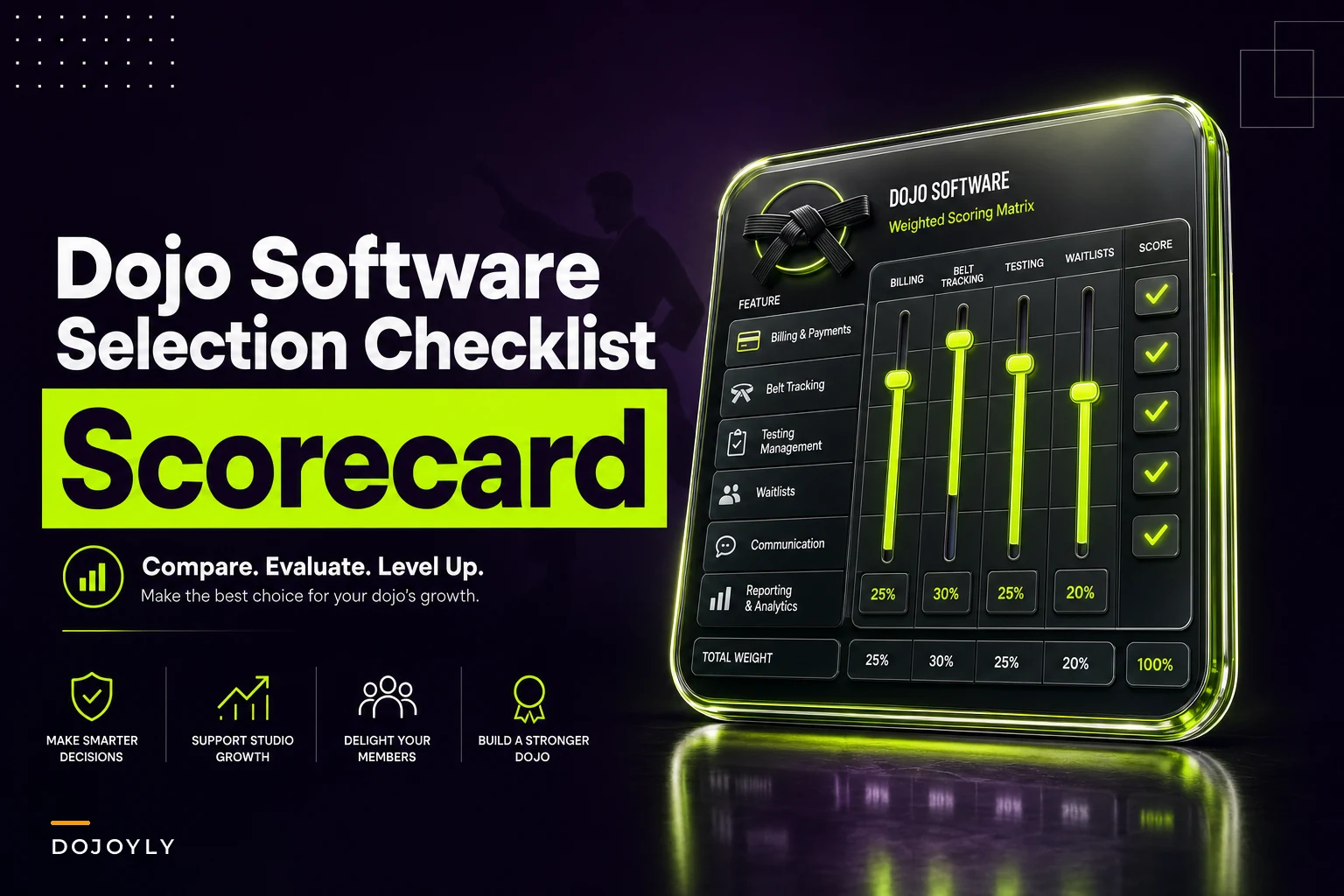
A scoring matrix only works if you set the weights before you see the demos. If you assign them after, you'll unconsciously inflate the categories your favorite vendor happens to be good at. Lock the weights first.
Here's a starting template. Adjust the weights to your situation, but keep the total at 100.
| Category | Weight | What you're actually scoring (1–5) |
|---|---|---|
| Rank & testing workflow | 20 | Can it track ranks, requirements, eligibility, and bulk‑promote cleanly? |
| Family / household billing | 18 | Multiple kids on one payer, auto‑applied discounts, no manual math |
| Recurring billing & failed payments | 15 | Reliable charges, retries, clear past‑due view |
| Class capacity & waitlists | 12 | Hard caps, automated waitlist notifications |
| Attendance & check‑in speed | 8 | Fast, low‑friction, accurate |
| Reporting & retention visibility | 8 | Can you see what's actually happening by program |
| Communication tools | 7 | Reminders, bulk messaging, built‑in not bolted‑on |
| Ease of use for front desk / instructors | 7 | Can a part‑time 19‑year‑old learn it in a shift |
| Support & onboarding quality | 5 | Response time, migration help, training |
Multiply each score (1–5) by the weight and you get a weighted total out of 500. The value here isn't the final number — it's that two people scoring independently and then comparing forces an honest conversation about where a vendor is actually weak.
One thing worth building in: a veto rule. If any must‑have category scores a 1 or 2, the vendor is out regardless of total. A platform that scores 480 overall but can't do family billing isn't actually a 480 for your school. The weighted total can hide deal‑breakers; the veto rule surfaces them.
> Build this as a simple spreadsheet — vendors in columns, categories in rows, weights in a fixed column, and a formula that flags any sub‑2 score in red. Takes fifteen minutes and saves you a year of regret.
Vendor interview questions that cut through the demo polish
Salespeople rehearse the happy path. Your job in the interview is to pull them off it. The questions below are designed to produce specific answers, not "yes, we support that."
On rank and testing:
-
"Walk me through promoting 30 students after a testing event. How many clicks, and can I do it in bulk or one at a time?"
-
"Can the system stop a student from being marked test‑eligible if they haven't hit their required class count?"
-
"If a student fails one requirement, how is that recorded, and does the instructor see it next class?"
On family billing:
-
"Show me a household with three kids where the third child is half price. Where does that discount live, and what happens if one child quits?"
-
"If a parent updates their card, does it update for all their kids automatically or does staff have to fix each one?"
On waitlists and capacity:
-
"A class is full. Someone cancels 90 minutes before. What exactly happens — automatically or does staff have to do something?"
On the parts they won't volunteer:
-
"What are the three things your customers most often complain about?"
-
"What does your software not do well that competitors do?"
-
"What's your actual average support response time — not your target, your average?"
That last one matters more than people think. A vendor who gets evasive about data export is telling you something. Ownership of your student and billing records should never be in question.
On pricing honesty:
-
"What's the total monthly cost at my member count, including payment processing, SMS, and any per‑location fees?"
-
"What triggers a price increase, and how much notice do I get?"
That last one matters more than people think. A vendor who gets evasive about data export is telling you something. Ownership of your student and billing records should never be in question.
Trial / pilot acceptance criteria — run it like a test, not a tour
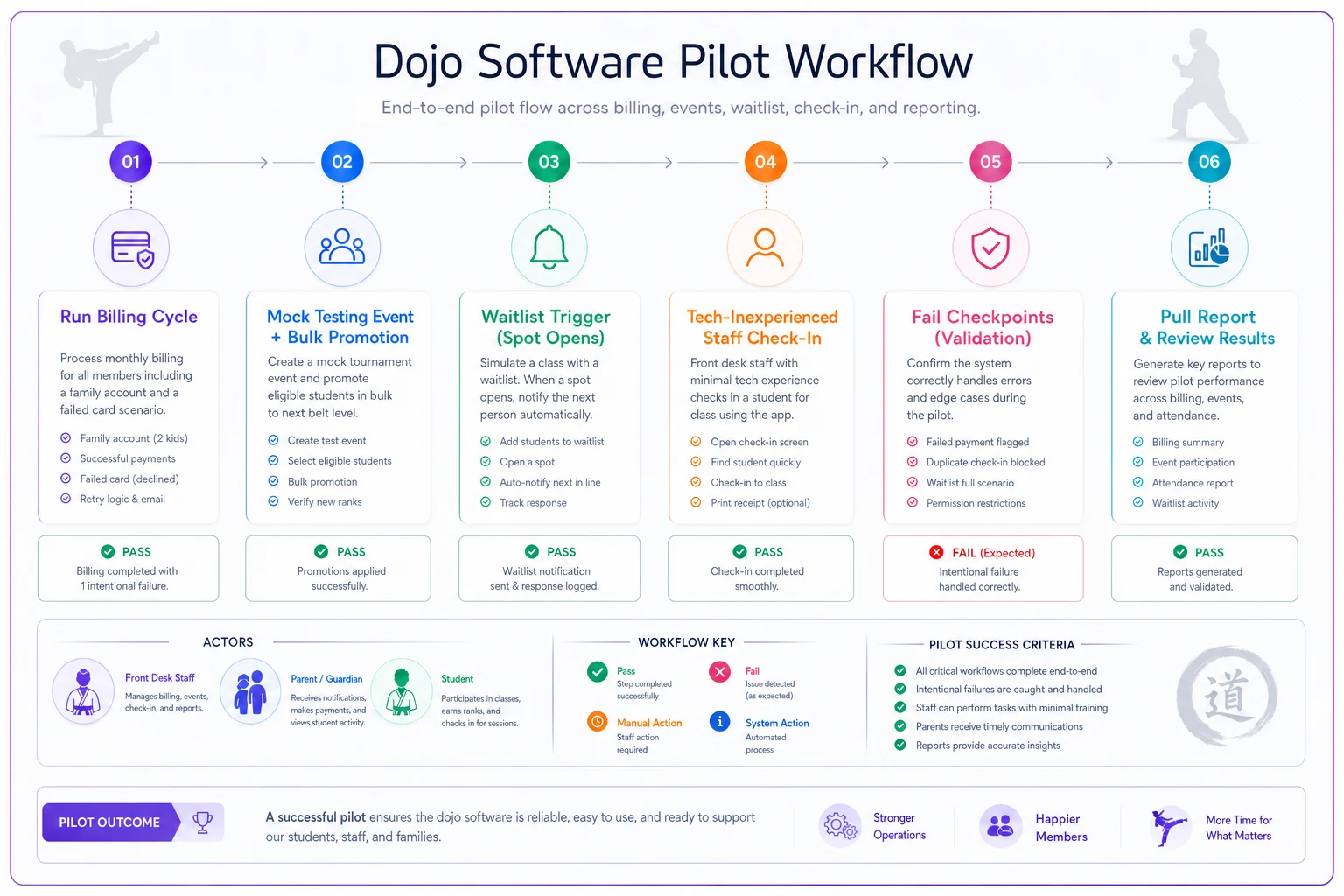
A free trial where you poke around for twenty minutes proves nothing. Treat the pilot like you'd treat a new instructor on probation: give it real tasks and a pass/fail standard decided in advance.
-
Run one real billing cycle (or a sandbox version) including at least one family account and one intentionally failed card. Did discounts apply correctly? Did the failed card get flagged and retried?
-
Process a mock testing event — mark 10 students eligible, pass 8, fail 2, and bulk‑promote the 8. Time how long it took.
-
Trigger a waitlist — fill a class, cancel someone, confirm the next person was actually notified without staff intervention.
-
Have your least tech‑comfortable staff member check students in during a live class. If they struggle, your data will suffer daily.
-
Pull one report that matters to you — like retention by program or past‑due totals — without calling support.
Here's a quick visualization of the pilot steps.
Write down the pass standard before you start. For example: "bulk promotion must take under five minutes," or "front desk must check in a class of 20 in under three minutes." Vague criteria produce vague decisions.
A simple ROI / cost template
Owners tend to compare software on sticker price alone, which is the wrong frame. The real cost is subscription plus processing fees plus the staff hours the system either saves or wastes. A cheaper platform that costs you five extra admin hours a week is not cheaper.
Monthly cost side:
-
Software subscription at your member count
$
-
Payment processing (roughly 2.5%–3.5% of what you run through it)
$
-
Add‑ons — SMS, extra locations, parent app
$
-
Total monthly software cost $
Value / savings side:
-
Admin hours saved per week × hourly cost × 4.3 weeks
-
Recovered revenue from better failed‑payment handling
-
Recovered revenue from waitlists filling spots that used to go empty
A realistic example:
A school with around 180 members spending close to 6 hours a week manually chasing failed cards, adjusting family bills, and managing a spreadsheet waitlist — at roughly $18/hour of staff time, that's around $460/month in labor on tasks the right system handles automatically.
If moving to a platform that covers those things costs about $160/month more than their current setup, but recovers even one or two memberships a month through failed‑payment retries (say $120–$240) and frees most of those 6 hours, the math flips quickly. The "more expensive" platform ends up net positive within the first couple of months.
The exact figures will vary. The point is to run your numbers this way instead of comparing two subscription prices and calling it a decision.
When paying more actually makes sense
If you run multiple programs with different curricula, have family‑heavy enrollment, or are approaching a second location, pay for the system that handles rank, testing, and household billing natively.
The premium is small next to the cost of outgrowing a cheap tool in a year and migrating again.
When it doesn't
A solo instructor with 40 adult students on simple month‑to‑month billing and no kids' programs does not need the most feature‑dense platform on the market.
Buying for a scale you don't have yet means paying for complexity that slows your front desk down. Match the tool to the operation you actually run today, with a little headroom — not the version you imagine in five years.
Who should hold off entirely
If your current pain is really a process problem — no consistent testing requirements, no clear billing rules, no defined class caps — software won't fix that. It'll just automate the chaos faster.
Nail down your rules first, then buy a system to enforce them. A good platform makes a clear process effortless; it can't invent the process for you.
Where automation genuinely earns its keep
Once you've narrowed the field, the platforms that save the most time tend to be the ones that quietly handle repetitive, error‑prone tasks without staff having to remember them. Automatically retrying a failed card, notifying the next family on a waitlist, flagging which students have hit their class count for the next test, applying the family discount without anyone doing mental math — none of it is flashy, but it's exactly the work that eats front‑desk hours and causes mistakes when done manually.
That's the practical lens to evaluate through. Not "does it have AI" as a checkbox, but "does it remove the specific manual steps that currently cause errors in my dojo." Weight that heavily. It's where the real return is.
Bringing it together
Choosing martial arts software well comes down to three things most buyers skip: evaluate against your hardest operational days instead of a feature wishlist, lock your scoring weights before you watch a single demo, and run a pilot with pass/fail standards you set in advance.
Do those three and the right choice usually becomes obvious — often it's not the flashiest option, but the one that handles belt testing, family billing, and waitlists without drama.
Take the checklist and scoring matrix above, build them into a simple spreadsheet, and score every vendor the same way. The goal isn't perfect software. It's finding the platform that fits your dojo's actual workflows closely enough that your staff stops fighting the tool and gets back to teaching.
Choosing martial arts software well comes down to three things most buyers skip: evaluate against your hardest operational days instead of a feature wishlist, lock your scoring weights before you watch a single demo, and run a pilot with pass/fail standards you set in advance.
Take the checklist and scoring matrix above, build them into a simple spreadsheet, and score every vendor the same way. The goal isn't perfect software. It's finding the platform that fits your dojo's actual workflows closely enough that your staff stops fighting the tool and gets back to teaching.
Ready to elevate your dojo operations?
Join 500+ martial arts studios using Dojoyly to save time, reduce scheduling conflicts, and improve member engagement.