



Most studio owners don't shop for software. They inherit it. Someone recommended a platform at a seminar, or the free trial was easy to start, and three years later you're running a 250-student academy on a tool built for a solo instructor teaching out of a church gym. The scheduling breaks when you add a second location. Belt tracking lives in a spreadsheet nobody trusts. Billing works until it doesn't, and then you spend two Saturdays a month reconciling failed charges by hand.
The goal of this guide is simple: help you pick a martial arts management software platform that fits where your business is and where it's going — not where it was when you signed up. We'll cover feature priorities by studio type, the evaluation criteria people skip, how to read pricing honestly, how to narrow a crowded market down to three serious contenders, and what to watch for in a contract before you sign.
This is a selection guide, not a migration manual. If you decide to switch after reading this, the detailed cutover work — field mapping, staged migration, getting staff to actually use the new thing — lives in a separate software migration playbook. Bookmark that for later.
Quick primer: who actually needs specialized software
Not every studio needs a purpose-built martial arts platform. If you're teaching two classes a week to 30 students and collecting cash or Venmo, a general scheduling tool and a notebook might genuinely be enough. Specialized software earns its keep when a few things become true at once:
-
You're managing recurring billing for more than ~50 members and manual invoicing is eating your evenings.
-
Belt progression and curriculum matter to retention, and you can't easily answer "who's eligible for testing next month?"
-
You have more than one instructor whose attendance and payroll depend on accurate class records.
-
You're thinking about a second location or already run one, and nothing talks to each other.
Most owners wait too long to switch, then switch in a panic. The right time to evaluate is before the pain becomes operational chaos — usually somewhere around 80–120 active members, or when you hire your first non-owner instructor who needs system access.
Your business model also drives the whole decision. A kids-heavy after-school program lives and dies by attendance tracking and parent communication. A competition-focused BJJ academy cares about scheduling flexibility and open-mat check-ins. A franchise cares about standardized reporting across sites. These aren't the same product, even though every vendor claims to do all of it.
Start evaluating around 80–120 active members or when you hire your first non-owner instructor who needs system access.
Most owners wait too long to switch, then switch in a panic. The right time to evaluate is before the pain becomes operational chaos — usually somewhere around 80–120 active members, or when you hire your first non-owner instructor who needs system access.
Core features to prioritize by studio type
Everyone's feature list looks the same on a comparison page. The difference is weighting. Here's how priorities actually shift depending on what kind of studio you run.
Simplify class bookings and attendance tracking.
Dojoyly helps you schedule, confirm, and manage every class effortlessly.
- Unified class & student management
- Automated member notifications
- Instructor scheduling & availability
No credit card required
| Feature | Solo / Small Studio | Growing Academy | Multi-Location / Franchise |
|---|---|---|---|
| Scheduling & class capacity | Medium | High | High |
| Attendance & belt tracking | High | High | Medium |
| Curriculum management | Medium | High | High |
| POS & recurring billing | High | High | High |
| CRM / lead pipeline | Low | High | High |
| Student / parent portal | Medium | High | High |
| Cross-location reporting | N/A | Low | Critical |
| Mobile app (staff + member) | Medium | High | High |
| Automation (reminders, dunning) | Medium | High | High |
| Role-based permissions | Low | Medium | Critical |
A few things worth calling out:
Belt and curriculum tracking is where cheap tools fall apart. General gym software treats everyone as "a member with a subscription." Martial arts is a progression business. If the system can't model ranks, stripe requirements, testing eligibility, and curriculum tied to each belt, you'll end up rebuilding it in spreadsheets — which defeats the purpose. For a small studio this is nice to have. For a growing academy it's the backbone of retention.
CRM matters more as you grow, not less. The solo owner knows every lead by name. The 300-student academy loses trials in the cracks constantly. Past roughly 150 members, a weak lead-tracking setup quietly costs you enrollments every month in ways you can't even see.
Reporting is the feature franchises underestimate until it's too late. Running two or three locations on software that can't give you a single consolidated revenue, attendance, and retention view means your "numbers meeting" is really a spreadsheet-merging exercise. That's an hour or two of someone's week, every week, indefinitely.
One common mistake: owners over-index on the member mobile app during demos because it's the shiny part. The app matters, but it's rarely what breaks your operation. Billing reliability and attendance accuracy break operations. Rank the boring stuff higher.
Must-have evaluation criteria (the parts people skip)
Data ownership and export. Before anything else, ask: if I leave, can I export my complete data — members, payment history, attendance, rank records — in a usable format, at no charge? Get the answer in writing. Some vendors make leaving deliberately painful. A clean export path is also your insurance policy; it's the first thing you'll need if you ever run the migration playbook.
Security basics. You're storing minors' information and payment data. At minimum you want PCI-compliant payment handling, encrypted data, and some statement about where data is hosted. You don't need to be a security expert — you need the vendor to answer plainly instead of dodging.
Multi-location support (real, not marketing). "Supports multiple locations" can mean "you can run two separate accounts and log in twice." Ask specifically: shared member records across sites? Consolidated reporting? Per-location permissions and pricing? A student who trains at both your locations — does the system see them as one person or two?
API and integrations. Check what connects to your accounting (QuickBooks/Xero), your email/SMS tools, and your website. If the platform is a walled garden, you'll be doing manual exports into everything else forever.
Offline mode. Mats lose Wi-Fi. If check-in requires a stable connection, your front desk will jam during the 5pm rush. Ask how attendance works when the internet drops.
Support and SLAs. What's the actual support channel — chat, email, phone? What are the hours relative to your timezone? Is onboarding included or a paid add-on? When billing breaks on a Friday night, response time stops being abstract.
Pricing models explained + total cost of ownership
Sticker price is almost never the real price. Here's how these platforms typically charge:
-
Per-active-member pricing — scales with your roster. Predictable when small, can get expensive fast as you grow.
-
Flat monthly tiers — fixed bands (e.g., up to 100, up to 300 members). Watch the jump between tiers.
-
Per-location pricing — common for multi-site tools, usually with a smaller add-on per extra location.
-
Payment-processing margin — some "cheap" platforms make their money on a cut of every transaction. A 0.5% spread on card fees sounds tiny until you run $40k–$60k monthly through it.
That last one is the trap. A platform advertising "$99/month" while taking an extra 0.4–0.6% on processing can cost you more than a $250/month platform with pass-through processing. Always calculate the blended cost at your actual transaction volume.
Total cost of ownership checklist
-
[ ] Base subscription at your current member count
-
[ ] Cost at your projected count 12 months out
-
[ ] Payment processing rate (and whether it's pass-through or marked up)
-
[ ] Setup / onboarding fees
-
[ ] Per-location or per-staff-seat add-ons
-
[ ] Charges for the mobile app, SMS credits, or email volume
-
[ ] Data export / offboarding fees
-
[ ] Annual price increase clauses
A realistic example: a studio around 180 members compared two tools. Option A was $149/month flat but added 0.5% to processing. Option B was $279/month with pass-through rates. On roughly $52k/month in billing, Option A's processing markup ran about $260/month — making the "cheaper" tool cost close to $410 all-in versus Option B's $279. The number on the pricing page was the wrong number to compare.
Narrowing the field: 50 → 10 → 3
The market is crowded and most options look identical from the outside. Use a funnel instead of trying to demo everything.
A visual workflow you can follow:
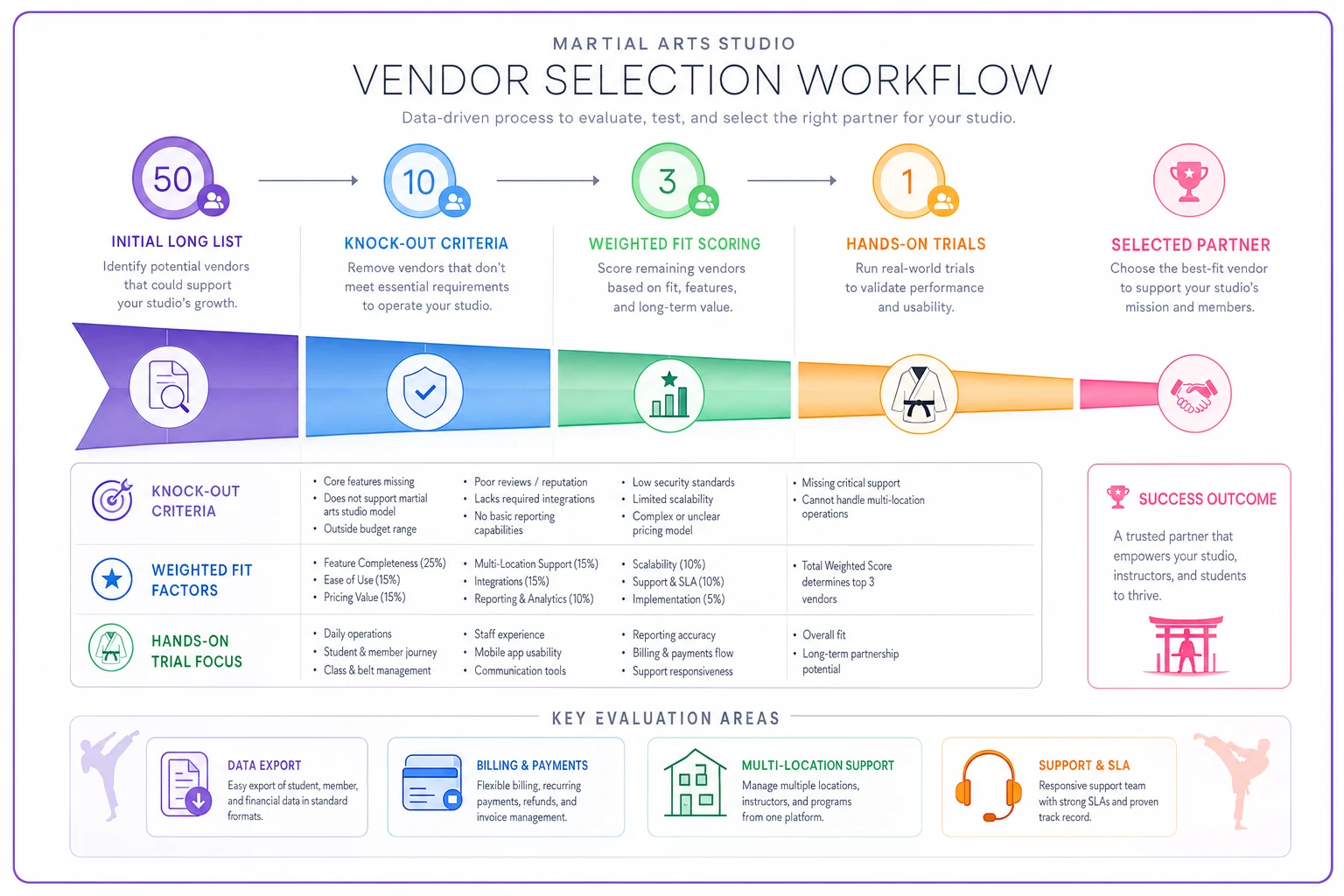
50 → 10 (knock-out criteria). This pass is fast and brutal. Eliminate anything that fails a hard requirement:
-
Doesn't support your business model (e.g., no real belt tracking for a progression-based studio).
-
No multi-location support when you need it.
-
Processing markup you won't tolerate.
-
No clean data export.
-
No support in your timezone.
10 → 3 (fit scoring). Score the survivors against weighted criteria (scorecard below) and read actual user reviews — specifically from studios your size. A tool beloved by solo instructors can be miserable for a 4-location franchise, and the reviews will tell you if you filter by studio size.
3 → 1 (hands-on). The final three get full trials and demos. Stop reading and start testing.
Vendor archetypes (not endorsements)
-
Lightweight / solo-friendly tools — simple, affordable, fast to start. Great under ~100 members. Tend to hit walls on multi-location and advanced reporting.
-
Full academy platforms — robust curriculum, CRM, automation, strong billing. Priced accordingly. The sweet spot for growing single-location academies and small groups.
-
Multi-location / franchise-grade systems — built around consolidated reporting, role permissions, and standardization across sites. Overkill (and overpriced) for a single studio, essential past 2–3 locations.
Match the archetype to your growth stage, not your ambition. Buying franchise-grade software for a 90-student studio means paying for complexity you won't use for years.
Trial & demo checklist + evaluation scorecard
Demos are sales theater. The vendor drives, everything works, the data is fake. Your job is to break that spell. Insist on a hands-on trial where you do the clicking, using your scenarios.
What to actually test during a trial
-
Enroll a mock student, assign them to a belt, and set up a recurring plan — time how long it takes.
-
Run a failed-payment scenario and see how the dunning/retry flow behaves.
-
Check a full class in on the mobile app during a busy moment (or simulate it).
-
Pull the three reports you'd actually use monthly. Are they there, or do they require an export?
-
Try to export all your data. See how clean the file is.
-
Have a non-technical staff member attempt check-in with zero training. Watch where they get stuck.
A simple evaluation scorecard
| Category | Suggested Weight | Vendor A | Vendor B | Vendor C |
|---|---|---|---|---|
| Billing reliability | 20% | |||
| Attendance & belt tracking | 15% | |||
| Ease of use (staff) | 15% | |||
| Reporting | 10% | |||
| Multi-location fit | 10% | |||
| Integrations / API | 10% | |||
| Support & onboarding | 10% | |||
| Total cost of ownership | 10% |
The weighted total forces you to compare on what matters to you, not on whichever feature the salesperson demoed best. Build this into a shared sheet so your head instructor and front-desk lead can score independently — the disagreements are usually where the real risks hide.
Contract negotiation tips and red flags
Once you've picked a winner, slow down for the paperwork. This is where favorable terms get locked in — or lost.
Negotiate these:
-
Lock your rate. Ask for a price guarantee for 12–24 months, or a cap on annual increases.
-
Month-to-month if possible. Avoid long annual lock-ins until you've run live for at least a quarter.
-
Onboarding included. Many vendors will waive setup fees to close a deal — ask.
-
A real trial of the paid tier, not just the stripped-down free version.
Red flags to walk away from:
-
Vague or paid data export ("we can discuss export options" means "we'll make it hard").
-
Auto-renewing annual contracts with a short cancellation window buried in the terms.
-
Processing rates that aren't disclosed in writing.
-
"Custom quote" stonewalling where they won't give pricing until you've sat through three calls.
-
Support that's only available in a timezone 8 hours off from yours.
Worth noting: the easier a vendor makes it to leave, the more confident they tend to be that you'll stay. The ones who trap you with export fees and lock-in clauses are usually the ones who know their product can't hold you otherwise.
Migration readiness (high level)
If you're switching rather than buying for the first time, do a readiness pass before signing anything:
-
[ ] Confirm you can export complete data from your current system.
-
[ ] Inventory what data actually matters (members, payment history, rank records, attendance, documents).
-
[ ] Pick a low-season window for cutover — not right before belt testing or a tuition cycle.
-
[ ] Line up who's responsible for what, and plan staff training.
-
[ ] Decide on a parallel-run period before you kill the old system.
That's the summary. The actual mechanics — canonical field maps, staged cutovers, and getting your team to adopt the new system without revolting — are covered in depth in the martial-arts software migration playbook. Don't attempt a live switch without reading it first.
A quick real-world scenario
A growing academy — around 210 members across one main location and a small satellite — was running on a lightweight tool that never truly supported two sites. Staff kept duplicate member records, monthly reporting meant merging two exports by hand (close to two hours every month), and failed payments slipped through because nobody owned the follow-up.
They ran the funnel: eliminated six tools on knock-out criteria, scored four finalists, and trialed two. The winner wasn't the cheapest on the pricing page — it landed around $300/month versus a $160 competitor — but it had pass-through processing and genuine multi-location records. At their volume, the blended cost came out roughly even, and the consolidated reporting alone gave back the two-hour monthly reconciliation. Failed-payment recovery improved once the dunning flow was automated instead of manual. Nothing dramatic overnight, but within a couple of months the admin drag was noticeably lighter and the numbers were finally trustworthy.
The lesson isn't "buy the expensive one." It's that the right choice only became obvious after they compared on total cost and real multi-location behavior — not on sticker price and demo aesthetics.
FAQs
How long should evaluation take? Budget 3–6 weeks. A week to build your shortlist, two to run trials, and some buffer for contract review. Rushing the trial is how you end up switching again in a year.
Should I pick based on the mobile app? No. It matters, but weight billing reliability, attendance accuracy, and data ownership higher. A beautiful app on top of flaky billing is still flaky billing.
Is per-member or flat pricing better? Depends on your trajectory. Per-member is cheaper while small but can sting as you scale; flat tiers are predictable until you hit the next band. Model both at your projected 12-month size.
What's the single most skipped question? "Can I get all my data out, cleanly, for free?" Ask it first. The answer tells you how the whole relationship will go.
We're a brand-new studio — do we need this yet? Probably a lightweight tool to start. Just make sure it exports cleanly so switching later isn't painful. Buying franchise-grade software for 40 students is paying for a future you haven't reached.
Resources
Build your own version of the evaluation scorecard in a shared sheet, have two or three team members score the finalists independently, and compare notes before deciding. When you're ready to move from choosing to switching, the migration playbook covers the field mapping, staged cutover, and staff adoption steps this guide intentionally left out.
Pick for where your studio is heading in the next two years — not where it is today, and not where you dream it'll be in ten. The platform that fits your current growth stage, with a clean exit if you outgrow it, beats the "does everything" tool you'll spend years half-using.
Pick for where your studio is heading in the next two years — not where it is today, and not where you dream it'll be in ten. The platform that fits your current growth stage, with a clean exit if you outgrow it, beats the "does everything" tool you'll spend years half-using.
Ready to elevate your dojo operations?
Join 500+ martial arts studios using Dojoyly to save time, reduce scheduling conflicts, and improve member engagement.