


Most studios bolted virtual classes onto their existing schedule during a scramble, kept them because a handful of students loved the convenience, and never went back to fix the operational mess underneath. That's the real problem. Virtual and hybrid classes don't fail because the tech is bad. They fail because there are no rules — no scheduling windows, no clear caps, no recording policy anyone agreed to, and billing that quietly leaks money because nobody decided how a hybrid student should actually be charged.
This post stays narrow on purpose. It's about the operational rules that make martial arts virtual class operations actually work: scheduling windows, class caps, recording policy, hybrid attendance reporting, and how billing ties back to which instructor gets credited. If your online offering feels like it's held together with tape, this is the tape-removal guide.
Where the money actually leaks: instructor assignment vs. billing
Start here, because this is the part almost everyone gets wrong — and it stays invisible until payroll or a quarterly P&L review blows it open.
A hybrid class runs Tuesday at 6pm. Eight students are on the mat, five are on Zoom. Coach Marcus teaches. But your virtual students are enrolled under a "Virtual Membership" priced differently — say around $89/month versus $139 for in-person. When payroll runs, who gets paid for those five virtual students? If your instructor comp is per-head or KPI-linked, that question matters a lot.
What ends up happening at a lot of studios is that virtual attendee revenue gets dumped into a general bucket, and the coach who actually taught the hybrid class only gets credited for the in-room heads. Over a month, a coach teaching four hybrid classes a week can be under-credited for 60–80 virtual attendances. If your comp model rewards attendance or retention, that's real money — and eventually a real morale problem.
-
Every class session gets a single primary instructor of record.
-
Virtual and in-person attendance both roll up to that instructor for the session.
-
Billing splits — if a virtual student is shared across a content team or a guest coach recorded the session — are defined before the class, not reconciled after.
If you run a payroll model that mixes hourly, per-class, and bonus components, the hybrid session needs an explicit assignment rule so it doesn't fall through the cracks. This connects directly to how you think about scheduling capacity overall — if you haven't tightened that side up, the operational playbook for scalable class scheduling is worth reading alongside this.
Scheduling windows: the rule that stops the 6:02 chaos
Virtual classes create a timing problem that physical classes don't. In person, a student either walks in or they don't. Online, you get people joining at 6:08, asking "did I miss warmups?", DMing the coach mid-class, and knocking on the virtual door after the session's already locked.
Simplify class bookings and attendance tracking.
Dojoyly helps you schedule, confirm, and manage every class effortlessly.
- Unified class & student management
- Automated member notifications
- Instructor scheduling & availability
No credit card required
The rule that fixes this is a live virtual scheduling window — a defined join period with hard edges.
-
Doors open 10 minutes before start (6:20pm for a 6:30 class)
-
Join cutoff 5 minutes after start (6:35pm — no entry after)
-
Recording note announced at the top, every time
-
Session locks at cutoff, automatically
The hard cutoff matters for a simple reason: a coach who's teaching live and also playing bouncer for late Zoom joiners is doing two jobs badly. In real operations, the coach either ignores the late joiners — bad experience — or interrupts the class to admit them, which is worse for everyone already there. The window rule removes the judgment call. Late means late. Watch the recording.
Automate the join cutoff in your platform so coaches never have to play bouncer while teaching.
Studios that skip the join cutoff tend to see virtual sessions drift longer and messier. Coaches burn out on "manage the tech while teaching" faster than on any in-person class. It's a real and predictable problem.
Class caps for hybrid: two numbers, not one
A physical class has one cap — how many bodies fit on the mat safely. Hybrid classes need two caps, and confusing them is a common mistake.
| Cap type | What it protects | Typical range |
|---|---|---|
| In-person cap | Mat safety, instructor sightlines | Whatever your space/insurance allows |
| Virtual cap | Coaching quality, ability to give live correction | ~8–12 for skill classes |
| Combined "attention" cap | Total students one coach can actually teach live | Set below the sum of the two |
The trap: studios set a physical cap of 16 and a virtual cap of 15 and assume a coach can handle 31 simultaneous students. They can't. A single coach giving live correction — the whole point of a live class versus a recording — maxes out fast when half the students are on a screen where you can't clearly see their footwork.
For skill and technique classes, keep the virtual cap low (8–10) and set a combined attention cap that reflects reality. For fitness-style or drilling classes where individual correction matters less, you can loosen the virtual number. Cardio kickboxing can run 20+ virtual attendees without much problem. A live grappling technique class can't, and pretending otherwise just produces students who learn things wrong on camera and get frustrated when they show up in person.
These aren't arbitrary numbers. They reflect what one instructor can actually manage while still teaching.
Recording policy: the rule that protects you and your content
Recordings are where studios get careless, and it bites them in two directions — student privacy and content leakage.
The moment a class is recorded, you've created a consent situation. A kid's face is on that video. A student's living room is visible behind them on Zoom. And your actual curriculum — the thing students pay for — is now a file that can be forwarded, downloaded, or posted anywhere.
-
Consent is collected at enrollment, not verbally mid-class. The membership agreement covers it.
-
Recordings are watermarked with the member's name or ID where possible, so leaks are traceable.
-
Access has an expiration — recordings available for 7 days, not forever. This protects content value and keeps your library from becoming a free curriculum dump.
-
Minors get stricter handling — cameras-off option, or separate consent, depending on your local rules.
-
Coaches know what's recorded and when — a coach venting about a student while assuming the recording stopped is a liability problem waiting to happen.
The expiration rule does double duty. It protects your intellectual property, but it also drives live attendance. If the recording lives forever, some members simply stop showing up live and drift toward passive watching — which is the fastest path to a cancellation. Keeping the live class the event matters for the whole membership lifecycle, and it connects directly to how you turn trials into long-term members through curriculum and billing.
Hybrid attendance reporting: the report you actually need
Attendance in a hybrid world isn't one number anymore. If your reporting still treats it like it is, you're making guesses on three decisions that actually matter: instructor pay, retention risk, and cap tuning.
What a useful hybrid attendance record captures per session:
-
Total attendance
-
In-person vs. virtual split
-
Join time and whether the student made the window
-
Watched-recording-only flag (attended nothing live)
-
Instructor of record
That "watched recording only" flag is the sleeper metric. A member marked "present" every week who's actually been recording-only for six straight weeks is a cancellation you can still prevent. Lump them into general attendance and you'll be blindsided when they churn.
Below is a simple visual of the workflow that captures scheduling through retention flagging.
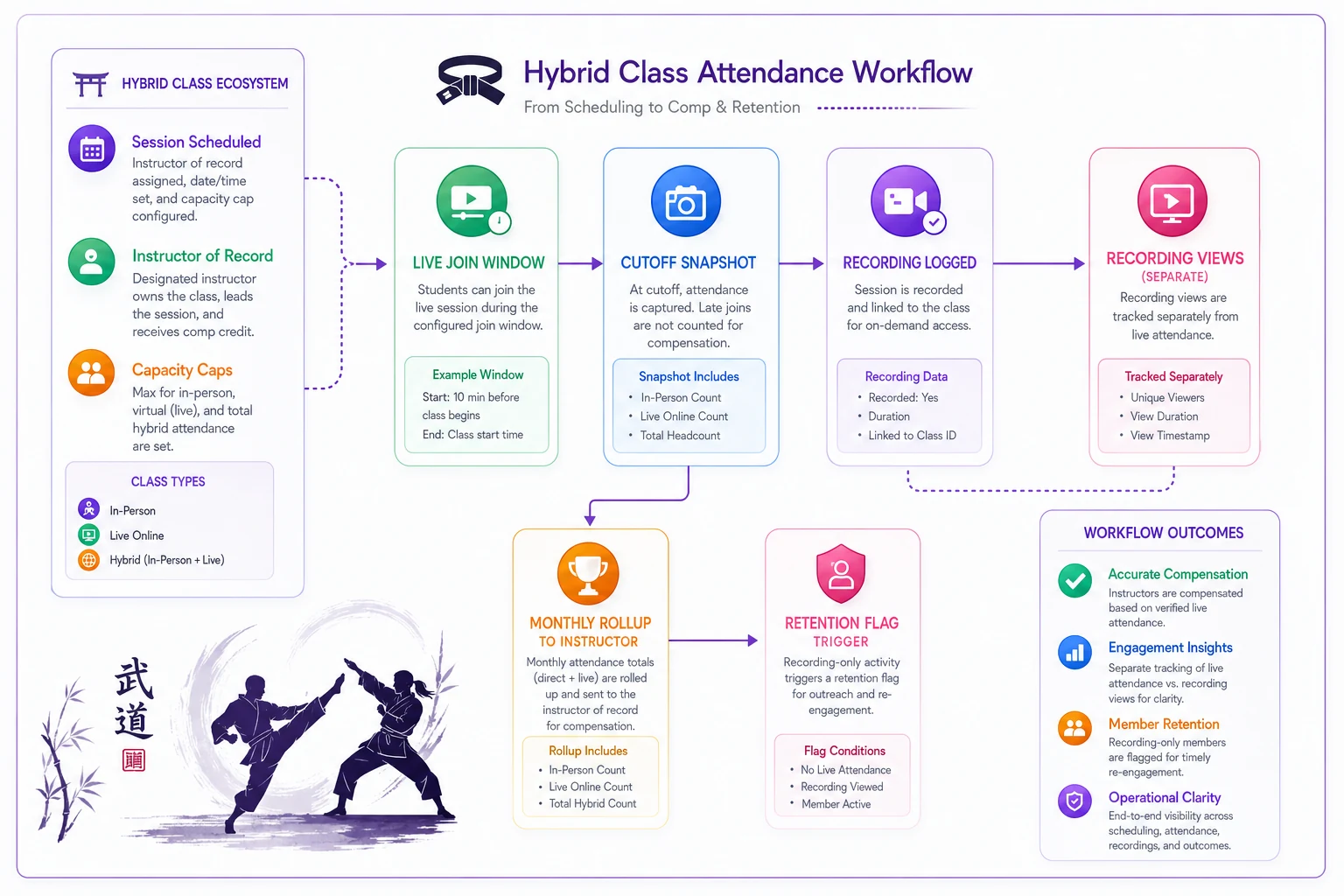
This is the kind of thing that gets painful to track manually once you're running more than a few hybrid classes a week. Studios doing it by hand usually end up with a spreadsheet that's a week behind and half-wrong. An operations platform that logs the window snapshot and recording views automatically — and rolls both to the right instructor — removes the manual step where the error creeps in. Not because software is magic, but because it eliminates the reconciliation headache before it starts.
-
Class is scheduled with a single instructor of record and both caps set.
-
Live attendance — in-person and virtual — is captured at the join cutoff. The window close is the attendance snapshot.
-
Recording views are logged separately and never counted as live attendance.
-
At month end, attendance rolls up to the instructor of record for comp, and to the student profile for retention monitoring.
-
Anyone with 3+ consecutive recording-only weeks gets flagged for outreach.
That workflow keeps the attendance signal clean and ties it directly to both retention work and payroll accuracy.
Billing splits when a class isn't "one instructor, one rate"
Most hybrid billing confusion comes from edge cases that repeat often enough to deserve a written rule:
-
Guest instructor teaches, home coach hosts who gets the attendance credit and how is revenue split? Rule: primary instructor of record gets teaching credit; hosting is a separate line if you pay for it.
-
A virtual student attends a class in a different location or program which site's revenue does it count toward? Rule: revenue follows the student's home program, attendance credit follows the instructor teaching.
-
Bundled membership — in-person plus virtual how do you split value for reporting? Rule: define an internal allocation (e.g., 70% in-person / 30% virtual) so per-class profitability isn't fiction.
The bundled case is the one that quietly wrecks P&Ls. If you sell a $149 hybrid membership and never decide how that revenue is attributed across the in-person and virtual classes the student attends, your per-class numbers are guesses. And you can't make good cap or scheduling decisions on guesses.
A real scenario
A mid-sized studio — roughly 210 members, four coaches — ran hybrid classes for about a year with no formal rules. Virtual attendees joined whenever they felt like it, recordings lived in a shared folder indefinitely, and coaches were paid a per-class rate plus a small attendance bonus.
Two problems surfaced. First, live virtual attendance had quietly dropped — a chunk of the virtual membership had drifted to recording-only, and around 15 of them cancelled over one quarter because "I never actually go anymore." Second, coaches teaching the busiest hybrid slots were being under-credited on the attendance bonus because virtual attendees weren't rolling up to them cleanly.
-
a 5-minute join cutoff
-
a 7-day recording expiry
-
a recording-only flag with outreach triggered at three consecutive weeks
-
a single instructor-of-record per session driving both attendance credit and comp
Within about two months, live virtual attendance recovered noticeably. The recording-only churn slowed because outreach caught people before they mentally quit. Coach comp disputes basically stopped because the credit rule was unambiguous. Nothing dramatic happened in month one — the win was that the leaks closed and the reporting finally told the truth.
When productizing virtual classes actually makes sense
You have consistent virtual demand — not two people who "might" join.
-
You can staff a coach who's genuinely good on camera, not just on the mat.
-
Your class types suit remote correction (fitness and drilling more than fine-technique grappling).
-
You're willing to enforce windows and caps instead of treating online as "come whenever."
If those conditions don't hold, productizing virtual classes is likely to cost more than it returns.
When it's a bad idea
Your live attendance is already thin and virtual would just cannibalize it.
-
Your coaches are stretched, and adding hybrid means every class is now two jobs.
-
You can't or won't build a recording consent and expiry process — the liability isn't worth a few extra memberships.
-
Your curriculum is your core moat and you have no way to stop it walking out the door as recordings.
In those cases, it's better to focus on the in-person product than to add a half-baked virtual layer.
Virtual and hybrid classes aren't a tech feature you switch on. They're a set of operational rules you either write down or pay for later in leaked revenue, miscredited coaches, and quiet churn. Set the scheduling window with a hard cutoff. Run two caps, not one. Make recordings expire. Log recording-only attendance separately and act on it. Tie every session to one instructor of record so both attendance and billing land where they should. Get those five rules in place and virtual stops being a mess you tolerate and starts being a product you can actually run.
Ready to elevate your dojo operations?
Join 500+ martial arts studios using Dojoyly to save time, reduce scheduling conflicts, and improve member engagement.